Powering an external AI chatbot with Palantir Foundry OSDK: a field guide
Oct 15, 2026
Daniel Ramirez
15 min read
Who this is for
Foundry developers, Forward-Deployed Engineers, and product engineers who've built Chatbot Studio chatbots inside Foundry and now need to expose one (or more) of them through a customer-facing or partner-facing app that lives outside the platform. If your PM has just asked for "an AI assistant on our marketing site that actually knows our ontology," this is the post for that ask.
Why you'd put the chat UI outside Foundry
Quick context, then we get into setup.
Foundry's Workshop is great for operator UIs. Chatbot Studio runs cleanly inside Foundry and embeds directly into a Workshop widget for any team member with a Foundry license. For most internal workflows, that's the right answer and you can stop reading here.
Some workflows aren't internal. A customer-facing assistant on your product. A partner portal where vendors need to chat with your AI. A logged-out experience on your marketing site. A whitelabel embed inside another company's app. In every one of those, the chat UI has to live somewhere users can reach without a Foundry account, and the visual identity has to belong to your product, not Palantir.
That's where the OSDK comes in. The Ontology SDK is the bridge between an external app and the Foundry platform. With it, you can read from your Ontology, invoke AIP Chatbot Studio chatbots (published as Functions), apply Actions, and stream agent reasoning, all from outside Foundry, through code in TypeScript, Python, or Java.
What you trade for that flexibility: you own the chat UI. You own the auth. You own the streaming. You own the rendering of reasoning. None of which is hard, exactly. All of which is more than zero. The rest of this post is how we lay out those layers cleanly.
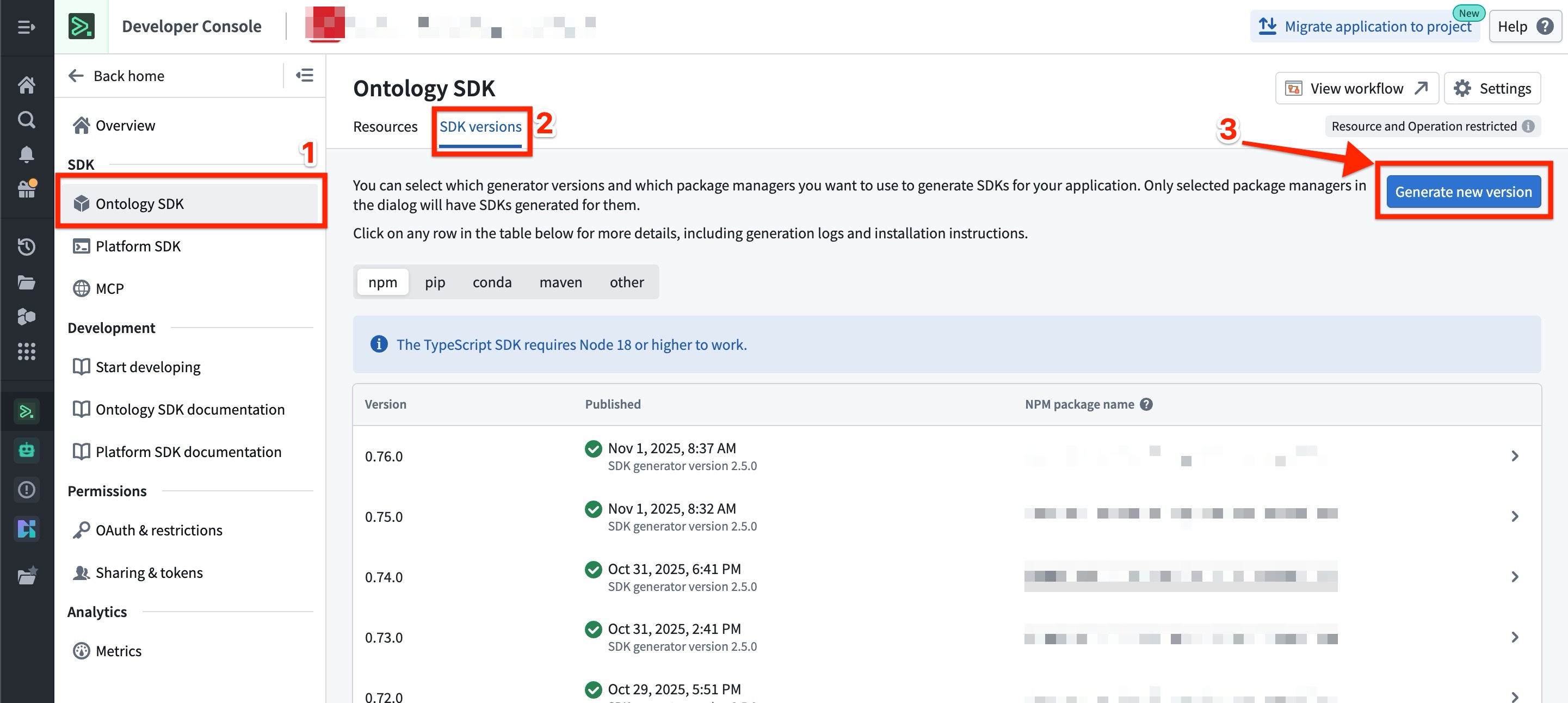
1. Prepare the Developer Console and generate the OSDK
The first thing you set up is the Developer Console application. This is the OAuth + scopes + OSDK definition that your external app will use to talk to Foundry. Get this wrong and the rest of the work papers over the mistake.
Register the OAuth client
In the Developer Console, create a new application. You'll pick between the two main OAuth client types (more here):
- Authorization Code Grant (with PKCE for SPAs). Each end user signs in via Foundry, gets their own token, and acts in Foundry as themselves. Permissions inherited from the user.
- Client Credentials Grant. The app has a single service-account identity. Every call is "the app" regardless of who's chatting. Permissions inherited from the service account.
The decision matters and we cover it in detail in section 2. For now, register at least one, knowing you may need both for different surfaces.
Configure scopes carefully
The OAuth client's scopes determine what your external app can do once authenticated. The big ones for a chatbot-driven app:
- Read scopes on the specific Ontology objects the chatbot needs to reason about.
- Function execution scopes on the AIP Chatbot Studio chatbot you'll be invoking (published as a Function).
- Write scopes on Action Types the chatbot is allowed to trigger (only if it writes back; if read-only, leave these off).
- Optional: Media Set read/write if the chatbot deals with documents, images, or video.
Be tight here. The OSDK inherits these scopes. Over-permissioning the OAuth client over-permissions every user that signs in through it. More on application scopes.
// Oauth scopes
const scopes = [
  "api:use-aip-agents-read",
  "api:use-aip-agents-write",
  "api:use-ontologies-read",
  "api:use-ontologies-write",
  "api:use-streams-read",
  "api:use-streams-write",
  "api:use-mediasets-read",
  "api:use-mediasets-write",
];
Pick the Ontology version
The OSDK is generated against a specific Ontology version. If your team is iterating heavily on the Ontology, decide whether you want the OSDK pinned to a specific branch (predictable, requires manual regeneration on Ontology updates) or tracking the main branch (always current, can surprise you when an Ontology change ships).
Default for production-facing chatbots: pin. Default for internal-tool chatbots: track main and accept the occasional break.
Generate and install the OSDK
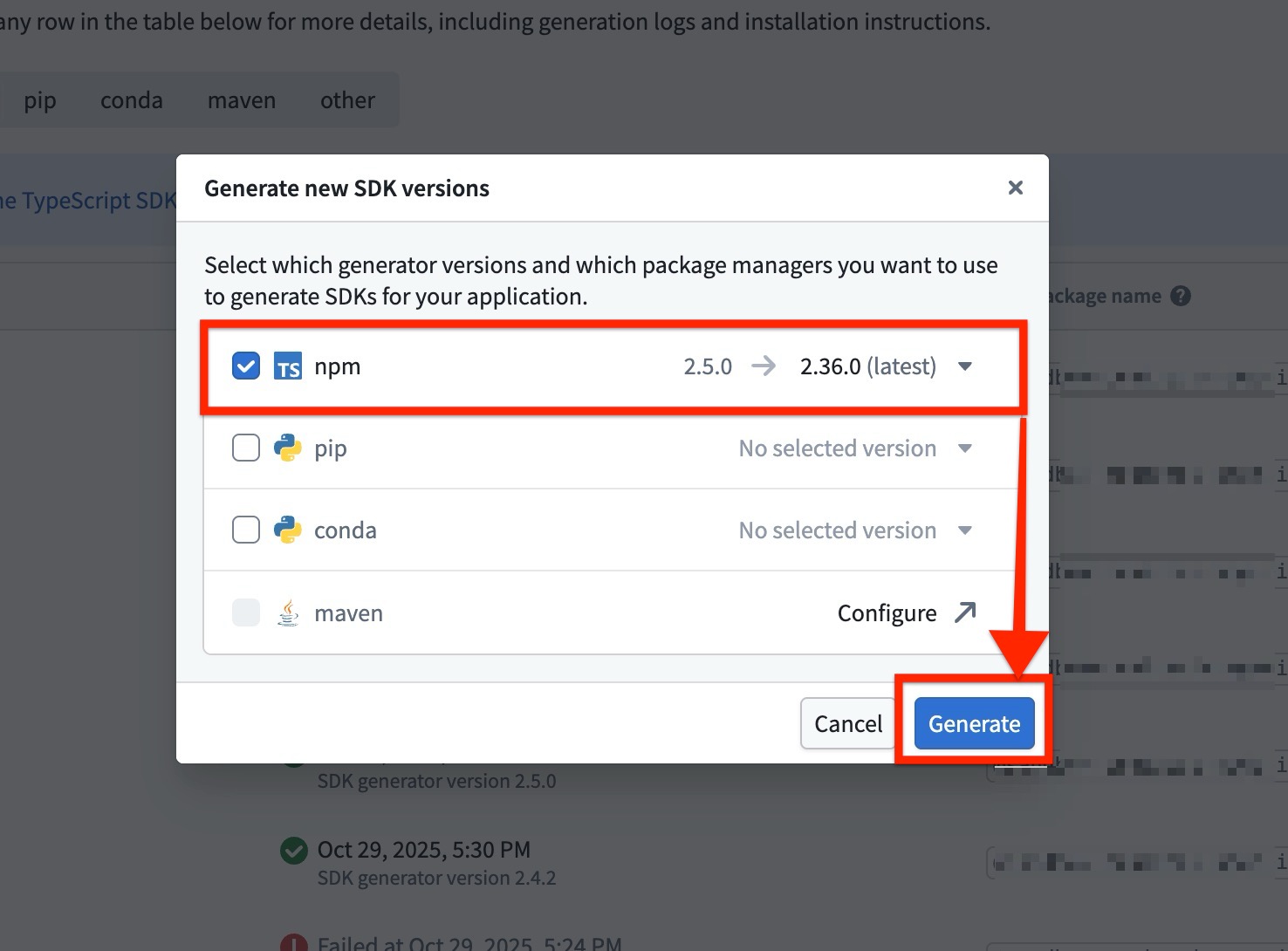
In the Developer Console, generate the OSDK in your language of choice. TypeScript, Python, and Java are first-class. The Developer Console gives you a versioned package you install in your app via npm (or pip, or Maven). Pin the version in your lockfile. Regenerating the OSDK on every Foundry merge is not a workflow you want.
2. Pick the right Foundry token
This decision shapes everything downstream: write-back audit, per-user permission enforcement, session ownership, even how you do streaming. Make it deliberately, not reflexively.
Option A: Authorization Code (per-user tokens)
Each end user signs into Foundry through your app's OAuth flow. They get an access token scoped to them. The OSDK inherits their RBAC. When the chatbot writes back to the Ontology through an Action, the audit log records the actual user.
Use this when:
- Your end users have Foundry accounts (employees, internal partners, anyone provisioned in your enrollment).
- Per-user audit is required (regulated workflows, compliance reviews).
- The chatbot's data access should mirror the user's existing dashboard access.
The catch: every user needs a Foundry identity. For a public-facing customer chatbot, this isn't going to work.
Option B: Client Credentials (service account)
Your app has a single service-account identity. Every call is "the app." User identity, if needed, has to be passed as application state (an explicit variable on the chatbot session) and trust depends on how seriously you authenticate the user upstream.
Use this when:
- Your end users don't have Foundry accounts (public, customer-facing, partner-without-license).
- You want a uniform identity for every call (logging is simpler, but per-user audit moves to your app, not Foundry).
- Latency matters and you don't want to do an OAuth round-trip for every session.
The catch: the service account becomes a single big trust boundary. You have to lock its scopes down hard and you have to authenticate the end user somewhere else (your own app, your own SSO, your own session layer). Foundry will record "the service account did this." You have to record "this end user, via the service account, asked for this."
A hybrid that often makes sense
For most external customer-facing chatbots, we use Client Credentials at the OSDK layer and pass the authenticated end-user identity into the chatbot's application state. The chatbot then uses that variable in its prompt and tool calls to constrain what it returns. Your app owns user auth. The OSDK owns Foundry auth. The two never confuse each other.
For internal employee-facing chatbots, we use Authorization Code with PKCE and lean on the user's Foundry RBAC for everything else.
3. Connect the OSDK and call your first chatbot
Once the Developer Console application is registered, scopes set, and OSDK generated, the wiring inside the app is straightforward. The shape, in pseudocode:
// External app, TypeScript example
import { createClient } from "@osdk/client";
import { createConfidentialOauthClient } from "@osdk/oauth";
import { $Functions } from "your-generated-osdk";

const client = createClient(
  "https://yourstack.palantirfoundry.com",
  "ri.ontology.main.ontology.your-ontology-rid",
  createConfidentialOauthClient("your-client-id", "your-client-secret", "https://yourstack.palantirfoundry.com")
);

// Invoke the chatbot (published as a Function from Chatbot Studio)
const response = await client(
  $Functions.yourChatbotFunction
).executeFunction({
  message: userMessage,
  sessionId: currentSessionId,
  applicationState: { userId: authenticatedUserId },
});
A few notes on what's happening:
- Token refresh.
createConfidentialOauthClientis called every time the OSDK needs to make a request. - Session ID. Chatbot Studio chatbots are session-aware. You pass a session ID to keep the conversation history coherent. Generate one per user-conversation and persist it (cookie, local storage, your session table, wherever).
- Application state. This is the canonical way to pass per-conversation context (user ID, tenant ID, filters, anything your chatbot's instructions reference). Documented as application state in Chatbot Studio.
- Response shape. A normal chatbot call returns the final message and (optionally) a reasoning trace. For streaming, see section 4.
The smoke test we use on the first deploy: a hardcoded message, a hardcoded session ID, an npm run dev of the external app, and a check that the response renders. Once that works, layer in user input, real session IDs, and the rest of the UX.
4. Showing agent reasoning in your UI
Chatbot Studio has a "View reasoning" surface inside the Foundry-native chatbot UI. It shows tool calls, intermediate decisions, and citations. The reasoning is also available over the API (also known as a Session Trace), which means you can render it in your external app.
The decision is what to show and when. A few patterns we use:
- Final answer + collapsed reasoning expand. Show the final response by default. Let the user click to expand the reasoning trace if they want to see the tool calls, the documents cited, the intermediate steps. This is the default. Most users don't care; some users care deeply.
- Inline tool call indicators during streaming. While the chatbot is thinking, show small UI indicators for each tool call ("Querying inventory...", "Looking up vendor history..."). This gives the user proof of work and a sense of progress, especially for slow flows. Don't reveal anything sensitive.
- Citations as links in the response. When the chatbot grounds an answer in specific Ontology objects, render citations as clickable references that the user can hover or click to verify.
- Don't show the system prompt or full reasoning by default. Some teams reflexively expose the entire chain of thought. We don't recommend it for customer-facing UIs. It leaks IP (the agent's instructions), and it gives a confidently wrong answer the same visual weight as a correct one. Curate the reveal.
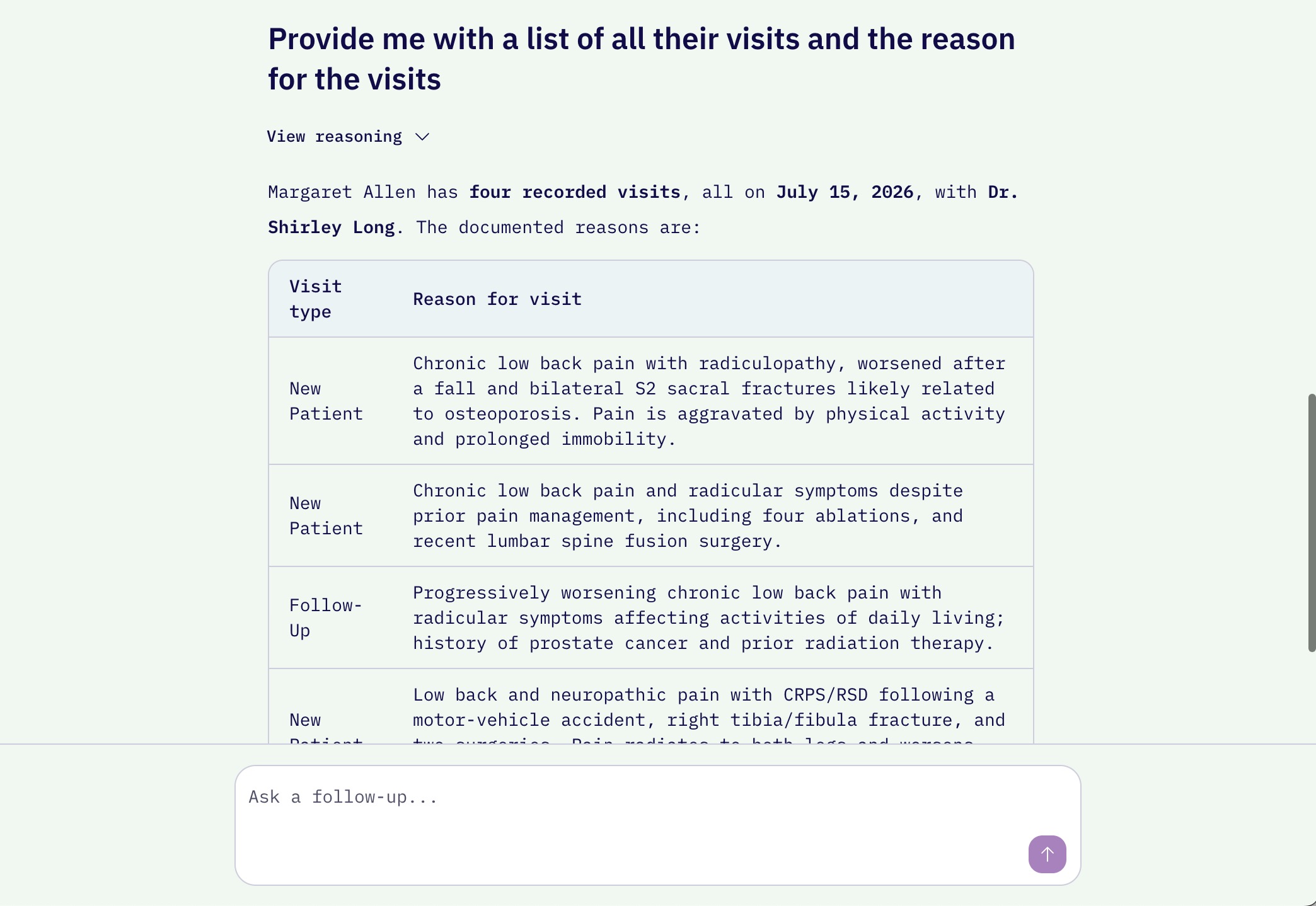
Chatbot with reasoning collapsed
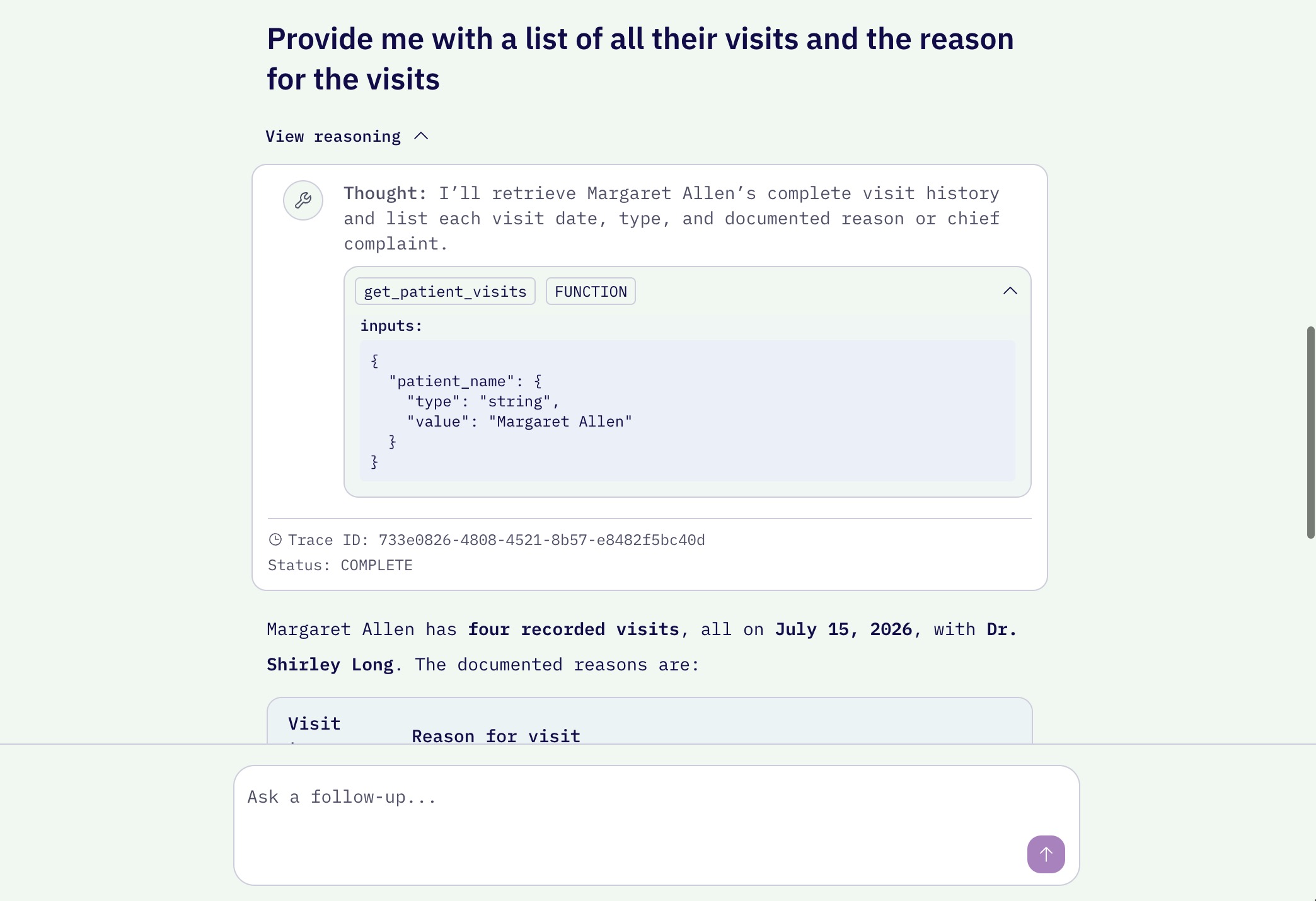
Chatbot with reasoning expanded
Streaming is a UX choice. Chatbot Studio's API supports it. The tradeoff: streaming gives the user faster perceived response time but requires a bit more wiring in your client. If your chatbot regularly takes more than two or three seconds for a first token, stream. If it's faster than that, the final-answer mode is usually cleaner.
5. Multiple chatbots in the same app
Often a single app needs more than one chatbot. A customer support assistant, a product recommendation chatbot, an internal analytics helper, all living in the same product. The OSDK handles this naturally because each chatbot is just a separate Function. The architecture question is about routing and state, not connection.
When to deploy multiple chatbots vs. one with branching
We default to one chatbot per coherent task domain, not one chatbot per UI surface. If two surfaces ask the same kind of question (e.g., "explain this product" and "compare two products"), they're the same chatbot. If they ask different kinds of questions ("recommend a product" vs. "open a support ticket"), they're different chatbots.
Why: a chatbot's instructions, tool set, and eval suite are all tied to a coherent task. Stretching one chatbot across two task domains makes both worse. Splitting them lets each one have its own instructions, its own tools, and its own evals.
Routing
In the external app, you decide which chatbot to invoke per user interaction. Patterns we've used:
- Surface-based routing. Each UI surface invokes its own chatbot. Simple, explicit, easy to maintain. Default.
- Intent-based routing. A small classifier (or a lightweight chatbot itself) routes the user's first message to the right specialist. Useful when there's a single chat UI but multiple downstream specialists.
- Manual routing. The user picks. Sometimes the cleanest answer is "let the user choose which agent to talk to" and skip the routing layer entirely.
Sharing or isolating application state
Each chatbot session has its own application state. If you want two chatbots to share context (e.g., both should know which customer the user is impersonating), pass the same variables into each session's application state when you initiate them. If you want them isolated, don't.
The mistake we've seen and made: trying to share session history across chatbots via application state. That's not what it's for, and it gets messy fast. Keep session histories per chatbot. If you need a shared "context object" for the user, persist it in your own store and re-pass it as application state on each call.
6. The orchestrator pattern: chatbots that call other chatbots
The most powerful pattern in Chatbot Studio's toolset is also the easiest to over-engineer. An orchestrator chatbot is one that, instead of doing the work itself, delegates to specialist chatbots through embedded function tools.
How it works
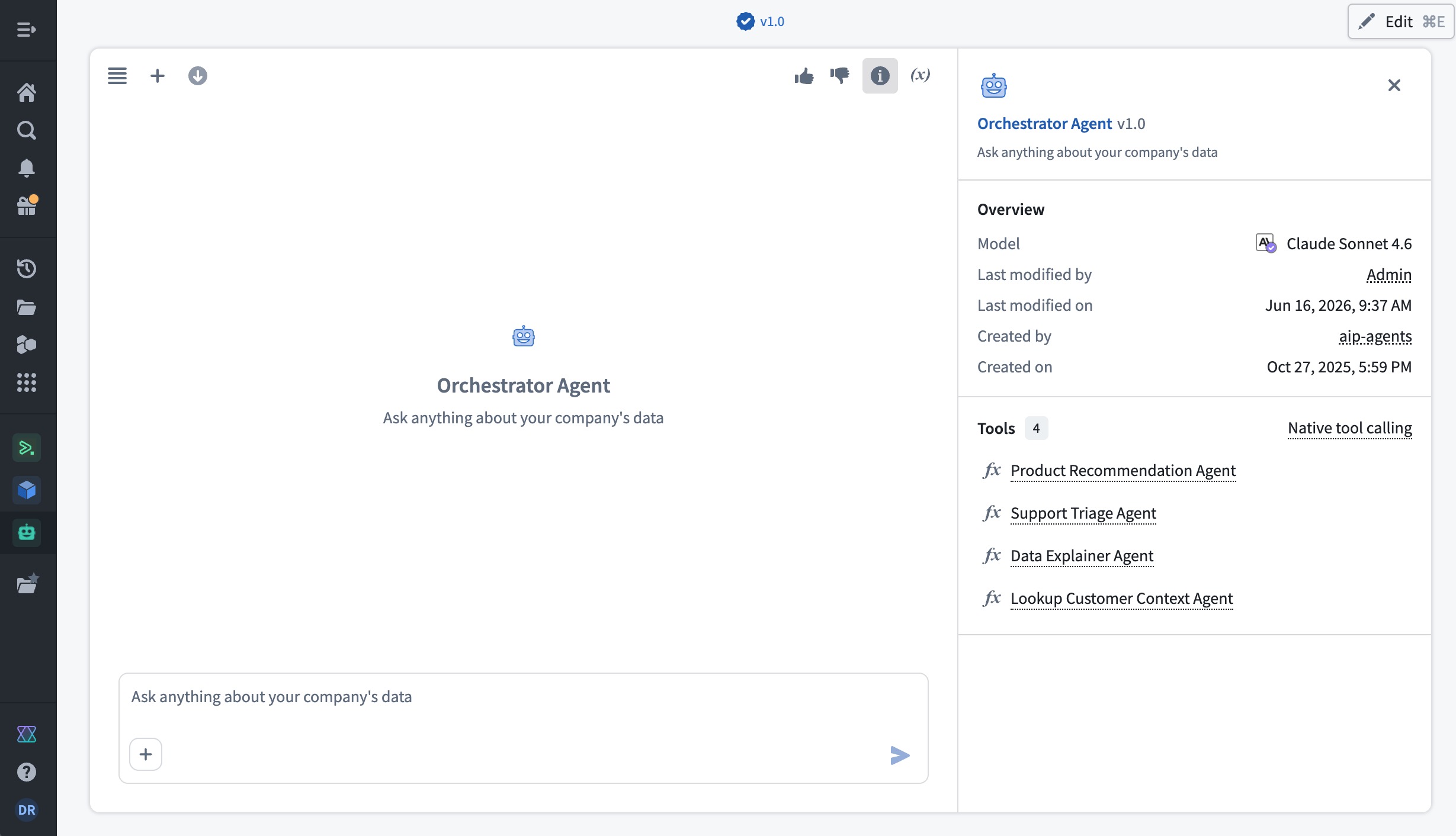
Chatbot Studio supports a Function tool, which lets a chatbot call any published Foundry Function (including AIP Logic functions, Compute Module functions, and other chatbots). The orchestrator's instructions tell it which specialist to call when. The specialists each have their own focused instructions, tool sets, and evals.
Orchestrator chatbot
├── Tool: callProductRecommendationChatbot (Function → another chatbot)
├── Tool: callSupportTriageChatbot (Function → another chatbot)
├── Tool: callDataExplainerChatbot (Function → another chatbot)
└── Tool: lookupCustomerContext (Function → AIP Logic function)
The orchestrator's job: read the user's message, decide which specialist (or sequence of specialists) is right, call them with the right inputs, and compose the result.
Why this is good
- Each specialist stays narrow and testable. Its eval suite is small and focused.
- The orchestrator is the only thing that needs to know the whole task topology. New specialists slot in by adding a tool.
- Reasoning composes cleanly when it works: the orchestrator's trace shows which specialists it called and why; each specialist's trace shows its own internal reasoning.
Why it gets hard
A few honest moments from chains we've had to redesign:
- Application state has to flow explicitly. The orchestrator's application state doesn't auto-pass to the specialist. You have to pass it as a parameter on the function call. We've shipped flows where this got lost and the specialist had no idea which customer it was reasoning about.
- Reasoning traces nest. The orchestrator's reasoning includes the calls; each specialist has its own reasoning. Rendering this in the UI without overwhelming the user takes thought. Default to showing the orchestrator's trace; let the user drill into a specific specialist's trace on click.
- Failures cascade in unhelpful ways. If a specialist returns garbage, the orchestrator may try to compose around it and produce a confidently wrong answer. We use the Agentic Quality Conductor module to route low-confidence specialist responses back for regeneration before the orchestrator sees them. Without something like that, you're trusting the orchestrator to detect garbage, which it won't always.
- Cost and latency compound. Each specialist call is its own LLM round-trip. An orchestrator that calls three specialists in sequence is at least four LLM round-trips for one user message. Plan for it.
When to reach for the orchestrator pattern: when you genuinely have multiple coherent specialist domains and the user's intents map cleanly to them. When to avoid it: when a single chatbot with a clear tool set can do the job. We've seen teams reach for orchestrators because it sounded sophisticated, then regret it. One good chatbot beats three mediocre ones tied together.
7. A few practical watchouts
A short list, in no order, that doesn't fit elsewhere.
- OSDK data transfer limits. Function responses serialize as JSON. Large payloads (image bytes, big arrays) break things. Use Media Set references for blobs and let the client pull them separately. Same rule as the safe write-back post.
- Token expiry on long sessions. If a user's session stays open longer than the token TTL, the next call will fail. Refresh proactively (silent refresh on a timer) rather than reactively (catch the 401 and retry).
- Rate limits. Foundry's API has rate limits. If your app spikes (cron job, batched user import, a viral marketing post), you'll hit them. Add backoff. Add a queue. Don't let one user's burst lock out everyone else.
- CORS in development. First-time setup on a localhost SPA against a Foundry stack usually hits a CORS wall. The Developer Console's allowed origins list is the fix.
- Permissions surface area for external users. When an external user (via Client Credentials) drives a multi-agent flow, every Function called inherits the service account's permissions. Audit this carefully. The service account should be the minimum that makes the chatbots functional, not the maximum.
Where AKOS fits
We've shipped this pattern enough times that we packaged most of it into our Arsenal. The AI Chatbot SDK App module is a pre-built external chatbot built on top of the OSDK. You bring your Developer Console application; we bring:
- The chat UI. Production-ready React component, themable to your brand.
- The auth layer. OAuth handshake, token refresh, session management, the hybrid pattern from section 2 wired up correctly.
- The graphing library. Ontology Graph Explorer-style component to render reasoning traces, related objects, and citations visually.
- The in-chat actions layer. Buttons, forms, confirmations inline in the chat that trigger Ontology Actions through the OSDK. The user approves, the action fires, the audit trail records it.
If you're building an external chatbot on Foundry from scratch, you're going to build all four of these. We've already built them, tested them, shipped them across customer projects, and we'd rather hand them to you than have you rebuild the same patterns.
When the Arsenal isn't the right fit, we ship the underlying patterns as a reference repo. Either way, the goal is the same: you spend your engineering time on the parts that are unique to your product, not on the OSDK plumbing that's the same for everyone.
What am I missing?
If you've shipped an external chatbot on Foundry OSDK and have hit a wall we haven't covered, write us. The OSDK and Chatbot Studio surfaces move every couple of months; the field guide has to move with them. Same offer if you think we're wrong on any recommendation: I'd rather be told loudly than be polite and miss it.
If you're standing up an external chatbot on Foundry and want a second pair of eyes on the architecture before you start, or you want a head start with the Arsenal module, talk to us. We'll send you the same reference architecture we use internally and walk through the token decision with you on a call.
Written by

Daniel Ramirez